

If you have been puzzled by the new presence of a small green or orange dot at the top of your iPhone, you’re not alone. The change happened in September 2020 for all iOS devices (that means, iPhone and iPad).
Recording Indicator in iOS 14
People have long been concerned about companies using apps to spy or eavesdrop on them.
Apple listened, and instituted a device-level setting that turns on a tiny orange dot when the microphone is on, or a green light when the camera/microphone is turned on.
So, you would expect to see the orange dot if you were talking on the phone with someone (even on an external bluetooth device, like AirPods). You would also expect to see the green dot if you were on a Zoom call (or the like).
But if you ever see either of these two turned on when you do not expect it, this is reason to be concerned. What can you do if you see them?
- Quit all open apps, or
- Restart your phone
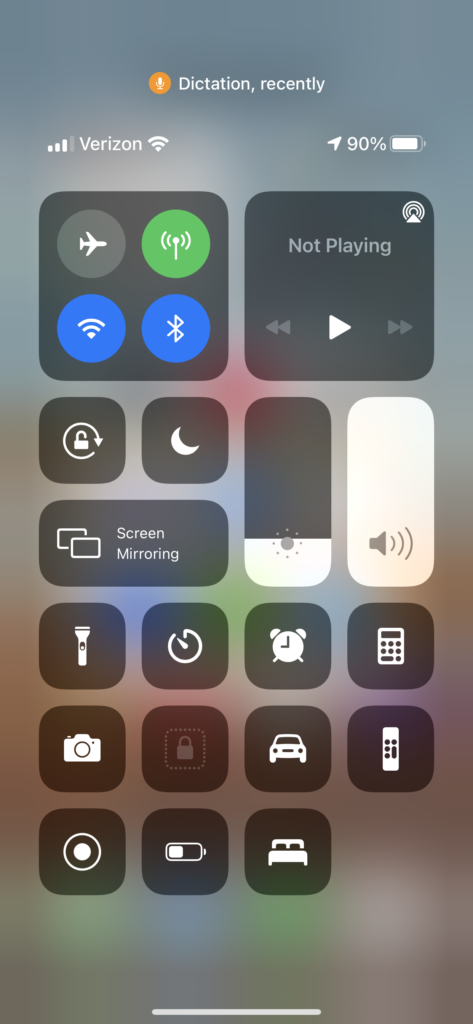
You can also open the Control Center to see which app most recently used your microphone and/or camera. (See photo below.)
Want more tips for iPhones? Check out this post on an easy way to erase an old iPhone.
Want help making this change to your system? Digital Helpmates offers one-on-one tech tutoring to home and business users at affordable prices. Find out more about our dedicated tech tutoring and Jumpstart Office Teams at https://digitalhelpmates.com.
Watch this on our YouTube Channel: “Tech Tips for the Technically Clueless:” What does the tiny dot at the top of my iPhone mean?