

Do you talk faster than you type? Looking for a typing assistant to help you write your memoirs or emails? You’ve got one, built into your Mac!
Turn on Dictation with Siri (Mac)
Siri does lots of things for you, but you must specifically turn on dictation. Here’s how to do it:
- Open System Preferences (the cog wheel icon).
- Click on Keyboard.
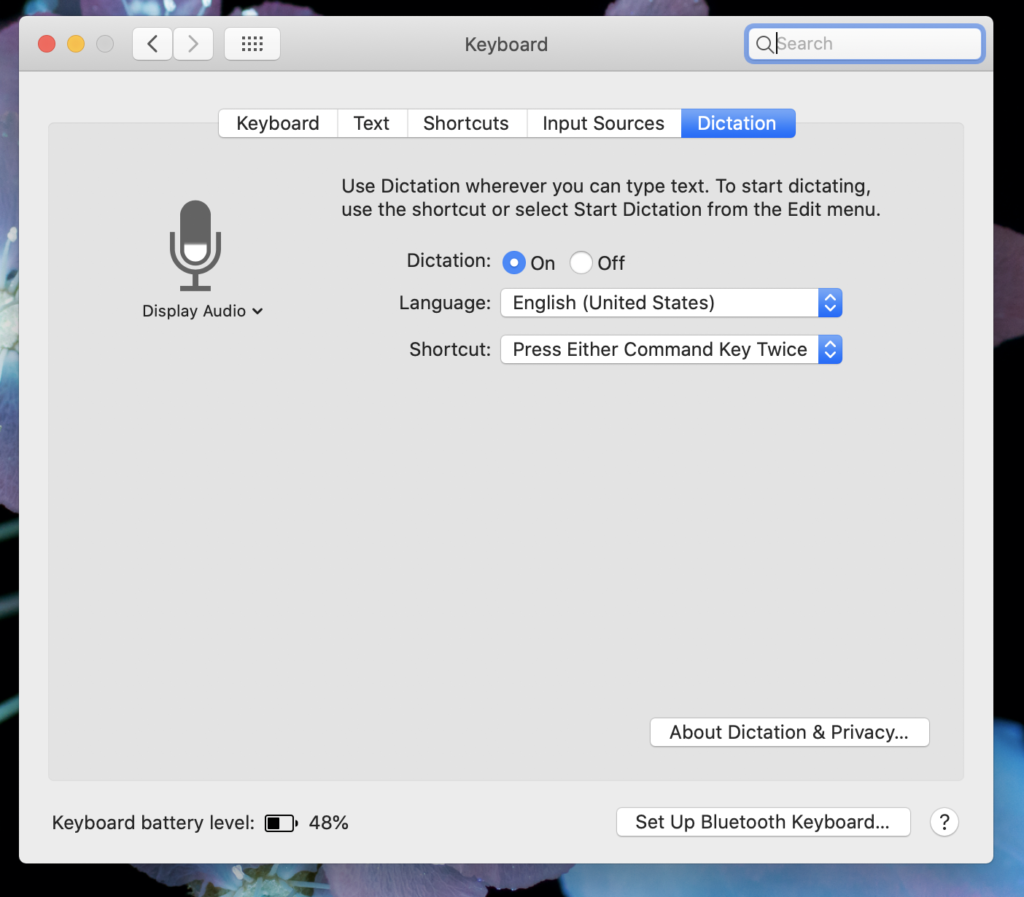
- Click on Dictation (last tab on the top row of window).
- Click “On” next to Dictation.
- Choose your shortcut for turning Dictation on and off. My favorite is “Press Either Command Key Twice.”
Then, once you are in an email or word processing document, turn on Siri using your shortcut (press Command Key twice, quickly). Do the same command to pause or stop dictation, and make any corrections. Remember, you need to speak all punctuation marks.
Here is a handy list of Siri punctuation commands: https://support.apple.com/guide/mac-help/commands-for-dictating-text-on-mac-mh40695/mac
Speaking of memoirs, check out this post on downloading library books to your device!
Want help making this change to your system? Digital Helpmates offers one-on-one tech tutoring to home and business users at affordable prices. Find out more about our dedicated tech tutoring and Jumpstart Office Teams at https://digitalhelpmates.com.
Watch this on our YouTube Channel: “Tech Tips for the Technically Clueless:” Let Siri Dictate Your Memoirs